 Skip to content
If you sell bags as a supplier, your real “sales team” isn’t only your merchandiser or your quotation sheet—it’s your photos and product content. A potential customer can’t touch your stitching, feel your fabric, or test your zipper. So they judge you by what you show: clarity, consistency, and proof. That’s why many suppliers lose inquiries even with good pricing: their images look random, specs are incomplete, and the product story feels vague. On the other hand, suppliers with average designs often win more business because their assets make the product feel safe to order.
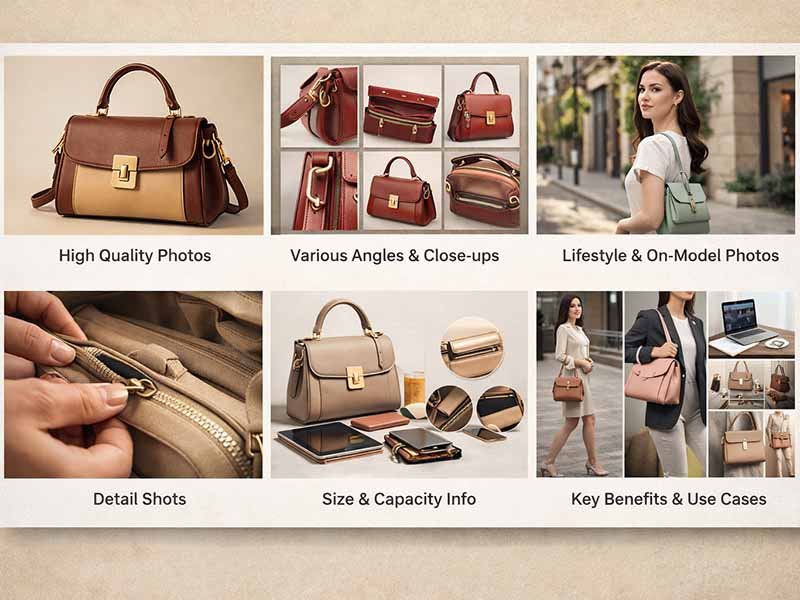
Photo and content guidelines help bags suppliers create assets that sell by standardizing what to shoot, what to write, and how to present proof of quality. The best assets show structure, materials, workmanship, capacity, and use cases in a repeatable format. When product photos and content answer practical questions clearly, customers trust faster, compare faster, and send inquiries with fewer back-and-forth messages.
Here’s the part most suppliers underestimate: search behavior has changed. People don’t only search “bag manufacturer.” They search questions like “which supplier can do low MOQ,” “how to check bag stitching quality,” “what photos should a supplier provide,” “are custom options clear,” and more. If your page answers those questions with strong visuals and structured content, you get more qualified inquiries—not just traffic.
A friend once told me they shortlisted two factories in one afternoon. Same category, similar MOQ. The winner wasn’t cheaper. The winner had photos that made the product feel “already proven.” That’s the difference we’re building here.
What Are Photo & Content Guidelines?

Photo and content guidelines are a clear set of standards that define how a bag product must be photographed and described so customers can evaluate it quickly and confidently. For bags suppliers, the goal is simple: reduce uncertainty. Good guidelines control angles, lighting, scale, detail coverage, technical specs, and customization notes—so every SKU looks professional and “ready to order,” not improvised.
What makes photo assets sell?
Selling photos do one job: they remove doubts that stop someone from sending an inquiry.
The strongest bag photo sets share these qualities:
- Color looks real (no heavy filters, no warm/yellow room light)
- Structure is readable (panels, piping, edge paint, gusset shape)
- Scale is obvious (bag size is understandable without guessing)
- Key functions are visible (closure, compartments, padding, straps)
- Consistency across SKUs (same angles, same background, same cropping)
A practical rule: if a person can’t answer these in 10 seconds, your photos are not doing their job:
- How big is it?
- What is it made of?
- How is it constructed?
- Where does it wear out first?
- What can be customized?
Data-style baseline (recommended minimum per SKU):
| Photo type | Minimum count | What it proves |
|---|---|---|
| Clean product views (front/back/side) | 3–5 | shape, proportions |
| Interior / opening | 2–3 | compartments, lining |
| Key details (zipper, stitching, hardware) | 4–6 | workmanship level |
| Scale reference | 1–2 | size, carry comfort |
| Use case (optional) | 1–3 | scenario clarity |
If you’re doing private label/OEM, “pretty photos” are not enough. You need inspection-style clarity.
What content builds trust fast?
Fast trust is created when your content answers the questions customers care about most: quality risk, fit for use, and production control.
Instead of long marketing paragraphs, build content in scannable blocks:
- Materials (what + why): fabric type, thickness, coating, lining, webbing, hardware grade
- Construction (how): stitch type, reinforcement zones, edge finishing, bonding/lamination
- Capacity (what fits): laptop size, bottle count, volume estimate, max load guidance
- Customization (what can change): logo methods, colors, zipper pulls, lining prints, labels, packaging
- Quality control (how checked): key checkpoints, stress points, defect standards
A customer reading your page should feel: “This supplier knows where problems happen and how they prevent them.”
A simple “trust stack” that works:
| Content block | What it reduces |
|---|---|
| Clear specs + dimensions | wrong size orders |
| Material details | performance complaints |
| Construction notes | durability doubts |
| Custom options list | back-and-forth emails |
| QC checkpoints | fear of inconsistency |
When these are present, inquiries become more serious, and sampling conversations move faster.
What standards matter most?
The most useful standards are the ones you can enforce repeatedly—across hundreds of SKUs, multiple teams, and different seasons.
Below are standards that customers notice immediately (even if they don’t say it):
1) Visual consistency standards
- Same background style (pure white or consistent neutral)
- Same light direction and brightness
- Same camera distance/cropping rules
- Same angle set per product category
2) Information standards
- Specs appear in the same order every time
- Same measurement method (flat vs filled)
- Same naming for materials and parts
- Same “customization menu” format
3) Proof standards
- Show 1–2 “risk points” clearly (stress seams, handles, zipper ends)
- Show interior and reinforcement (not only the outside beauty shot)
Recommended website image standards (practical ranges):
| Item | Recommended | Why it matters |
|---|---|---|
| Main image aspect ratio | 1:1 or 4:3 | stable layout, easy scanning |
| Long side resolution | 2000–3000 px | zoom without blur |
| File size (web) | 150–400 KB | speed + clarity |
| Format | WebP / JPEG | fast loading |
| Background | white/neutral | reduces distraction |
These standards are not for “design preference.” They are for conversion and trust.
Which Photo Assets Sell Bags Best?

Photo assets that sell bags best are not the most artistic ones — they are the ones that answer purchasing questions without explanation. When customers evaluate a bag supplier online, they are trying to decide three things very quickly:
- Do I understand this product clearly?
- Does this supplier control quality and structure?
- Can this be reproduced consistently for my market?
The photo assets that perform best are those that remove uncertainty step by step, instead of trying to impress visually.
Below is a breakdown of the photo types that consistently help bag suppliers receive more serious, better-qualified inquiries.
1. Core Product Views (Front / Back / Side / Angle)
These are the foundation of every selling photo set. Without them, nothing else works.
Customers use core views to judge:
- Overall shape and proportions
- Symmetry and panel alignment
- Style positioning (casual, technical, premium, utility)
What works best in practice
- Neutral background (white or light grey)
- Same angle set for every SKU
- Bag lightly filled so structure is visible
- No extreme angles or perspective distortion
What customers dislike
- Collapsed bags that hide structure
- Cropped edges
- Inconsistent angles between products
Minimum standard that works well:
| View | Purpose |
|---|---|
| Front view | overall design |
| Back view | straps, padding |
| Side view | thickness, gusset |
| 45° angle | volume perception |
If a customer cannot quickly understand the bag’s shape from these views alone, the photo set is already weak.
2. Interior & Opening Photos (Often the Deciding Factor)
Interior photos are where many suppliers lose or win trust.
Customers want to see:
- How wide the opening is
- Whether the bag collapses or holds shape
- Pocket layout and depth
- Lining finish quality
Interior photos are especially important for:
- Backpacks
- Laptop bags
- Tool bags
- Travel and gym bags
Strong interior photos show
- The bag fully opened
- Pockets clearly separated
- Padding thickness visible
- Stitching inside, not hidden
Weak interior photos
- Shot from too far away
- Dark, shadowy interiors
- Bag half-open with nothing visible
Interior photo checklist:
| Interior detail | Why it matters |
|---|---|
| Opening width | usability |
| Pocket layout | organization |
| Lining finish | quality control |
| Padding visibility | protection |
For many customers, interior photos matter more than lifestyle images.
3. Detail Photos (Where Trust Is Built)
Detail photos are not “extra” — they are proof.
Experienced customers look for detail shots to evaluate:
- Stitch consistency
- Reinforcement at stress points
- Hardware thickness and finish
- Zipper quality and end treatment
If detail photos are missing, customers often assume:
- The supplier is hiding weaknesses
- Quality is inconsistent
- Product is not ready for scaling
High-impact detail areas to always show:
- Handle and strap attachment
- Zipper ends (common failure point)
- Corner seams
- Bottom panel construction
- Hardware connection points
Recommended detail priority:
| Detail area | Risk it addresses |
|---|---|
| Strap anchors | load failure |
| Zipper ends | breakage |
| Corners | abrasion |
| Bottom panel | deformation |
| Hardware joints | long-term wear |
Detail photos should be sharp, close, and honest. Over-editing destroys trust.
4. Scale & Capacity Photos (Preventing Size Disputes)
One of the most common problems in bag sourcing is size misunderstanding.
Customers want to know:
- How big the bag really is
- How it sits on a body
- What fits inside without forcing
Photos that show scale reduce:
- Sampling rejections
- Miscommunication
- Redesign cycles
Effective scale photos include
- Bag worn by a person (neutral posture)
- Bag placed next to common items (laptop, shoes, bottle)
- One clear reference per image
Avoid
- Fashion poses that distort size
- Too many props
- Wide shots where the bag looks smaller than it is
Scale clarity table:
| Method | Best use |
|---|---|
| On-body shot | comfort, carry position |
| Item comparison | capacity |
| Open + filled | usability |
Clear scale photos save time for both supplier and customer.
5. Functional Use Photos (Only When Purpose Is Clear)
Functional photos work when they explain something specific, not when they try to look stylish.
They are most useful for:
- Cooler bags
- Tool bags
- Travel bags
- Sports and outdoor bags
Good functional photos show:
- The bag in one clear scenario
- Realistic load
- One purpose per image
Bad functional photos:
- Try to show too many uses
- Focus on people instead of product
- Hide key construction details
Best practice
Use 1–3 functional photos maximum, and only when they clarify function that studio photos cannot.
6. Customization Reference Photos (OEM/Private Label Projects)
For OEM and private label customers, photos that show customization possibilities are powerful sales tools.
These photos don’t need to be product-specific — they can be reference images.
Examples:
- Logo methods (embossed, printed, woven label)
- Zipper pull variations
- Lining color options
- Packaging examples
Why these photos sell
They help customers visualize their product, not just yours.
Customization photo value:
| Photo type | What it triggers |
|---|---|
| Logo placement | brand thinking |
| Material options | differentiation |
| Packaging | market readiness |
These images often lead directly to inquiries.
What the Best-Selling Photo Sets Have in Common
Across different bag categories, strong photo assets usually share these traits:
- Consistent angles across SKUs
- Clear structure visibility
- Honest material representation
- Logical photo order
- No unnecessary decoration
They don’t try to convince.
They explain clearly, which is what customers value most.
If a customer can understand the bag well enough to explain it to their team without asking you questions, your photo assets are doing their job.
How to Create Photo Assets That Sell

Photo assets sell when they are produced with a repeatable system, not improvisation. For bag suppliers, this means controlled lighting, fixed angles, consistent styling, and clear rules for detail coverage. When every product follows the same visual logic, customers compare faster, trust quality more easily, and feel confident requesting samples or custom quotations.
How to shoot clean product photos
Clean product photos are not about expensive cameras. They are about control.
Most suppliers fail here because photos are taken:
- In mixed lighting (window + ceiling light)
- Too close or too far (distorted proportions)
- Without structure support (collapsed bags)
A reliable shooting setup looks like this:
Lighting
- Two soft lights at 45° angles (left/right)
- One soft fill light or reflector from the front
- No overhead hard light (creates ugly shadows inside bags)
Camera position
- Lens height aligned with bag center (not top-down)
- Distance fixed for each category (e.g. backpacks vs totes)
- Tripod always used
Bag preparation
- Fill bag with neutral inserts (foam, paper)
- Smooth wrinkles but do not over-stretch
- Close zippers naturally (not fully tensioned)
Recommended baseline settings (non-brand-specific):
| Item | Recommended range | Reason |
|---|---|---|
| Aperture | f/8 – f/11 | sharp details |
| ISO | 100–200 | low noise |
| White balance | fixed | color consistency |
| Shooting distance | consistent per SKU | scale accuracy |
The goal is not beauty — it’s inspection clarity.
How to style bags naturally
Styling should never hide structure or mislead usage.
For suppliers, “natural styling” means:
- Bag looks usable, not staged
- Bag appears full enough to show shape
- No unnecessary props blocking edges or seams
Do this
- Insert common items (laptop dummy, notebooks, towels)
- Keep color palette neutral
- Let straps hang naturally
Avoid this
- Over-styling with fashion props
- Extreme angles that distort proportions
- Hiding stress points (corners, handles)
A simple rule that works well:
If a customer screenshots the photo and sends it to their team, will everyone understand the product without explanation?
If the answer is yes, the styling works.
How to prepare images for web
Many suppliers lose trust at the final step: bad web preparation.
Problems customers notice instantly:
- Blurry zoom
- Slow loading
- Inconsistent image sizes
- Cropped-off details
Web preparation checklist:
| Step | Standard |
|---|---|
| Master file | 3000 px long side |
| Web output | 2000–2400 px |
| Compression | balanced (no artifacts) |
| Format | WebP / optimized JPEG |
| Background | clean white or neutral |
| File naming | product-type + view |
Clean file structure improves:
- Page speed
- Image search visibility
- Internal team efficiency
Small details here quietly affect how “professional” a supplier feels.
Do Content Assets Influence Sales?

Yes. Content assets strongly influence sales because they reduce uncertainty. Clear descriptions, technical specs, and structured information help customers decide whether a bag fits their market before requesting samples. When content answers practical questions clearly, inquiries become more serious, faster, and easier to convert into custom orders.
Do descriptions affect decisions?
Most customers do read descriptions — but they scan, not read line by line.
That’s why long paragraphs fail. What works is structured clarity.
Effective bag descriptions usually follow this order:
- What the bag is for (use case)
- What it’s made of (materials)
- How it’s built (construction)
- What fits inside (capacity)
- What can be customized (options)
Bad description style
- Marketing adjectives
- Vague claims (“high quality,” “premium feel”)
- No numbers, no structure
Better description style
- Concrete facts
- Simple language
- Real constraints explained
Example (supplier-style, not consumer copy):
- Outer material: 600D recycled polyester, PU coated
- Lining: 210D polyester, light grey
- Structure: foam padding on front/back panels
- Closure: reverse coil zipper, double pullers
- Load recommendation: daily carry under 6–8 kg
This kind of content doesn’t try to sell emotionally — it sells by reducing risk.
Do specs improve confidence?
Specs are one of the strongest trust signals for OEM and private label customers.
When specs are missing, customers assume:
- The supplier hasn’t tested the product
- Details will change later
- Quality control may be inconsistent
Core spec blocks customers expect:
| Spec category | What to include |
|---|---|
| Dimensions | W × H × D (method stated) |
| Weight | empty bag |
| Materials | outer, lining, webbing |
| Hardware | zipper type, metal/plastic |
| Structure | padding, stiffeners |
| Capacity | laptop size / volume |
| Custom options | logo, color, packaging |
A key detail many suppliers miss:
State how measurements are taken (flat vs filled). This avoids disputes later.
Do visuals and text need alignment?
Absolutely. Misalignment creates doubt — even if both are “correct.”
Common alignment problems:
- Photo shows 2 pockets, text says 3
- Text says padded, photo doesn’t show padding
- Dimensions listed but no scale reference photo
- Custom options mentioned but not shown visually
Best practice:
Every major text claim should be visually supported somewhere on the page.
| Text claim | Visual support |
|---|---|
| Padded compartment | interior padding photo |
| Reinforced handle | close-up stitch photo |
| Fits 15.6” laptop | scale or usage photo |
| Custom logo | logo method image |
When text and visuals reinforce each other, customers stop questioning and start planning.
Are Technical Details Selling Assets?

Yes. Technical details are selling assets because they demonstrate control, experience, and honesty. For bag suppliers, showing construction logic, stress points, and material choices reassures customers that the product can be reproduced consistently at scale. Technical clarity turns interest into real OEM conversations.
Are size and material required?
Size and material details are non-negotiable for serious customers.
Customers use size to check:
- Fit with their market needs
- Shipping cost implications
- Platform listing accuracy
They use material details to judge:
- Durability
- Price positioning
- Compliance risk
Minimum material disclosure standard:
- Fabric type + density or thickness
- Coating or finish
- Lining type
- Webbing width
- Hardware material
Avoid hiding behind generic terms. Specificity builds trust.
Are structure and function needed?
Structure is what separates a “bag” from a usable product.
Customers want to know:
- Where weight is supported
- Where stress concentrates
- Where failure usually happens
Showing structure signals manufacturing experience.
High-value structure details to explain:
- Bottom reinforcement (or lack of)
- Panel padding placement
- Strap attachment method
- Internal stiffeners
A simple diagram or photo + short explanation often does more than a full paragraph of marketing copy.
Are usage scenarios helpful?
Usage scenarios help customers map your product to their own market.
Good scenarios:
- One clear use per image or section
- Realistic load
- Realistic environment
Avoid mixing too many scenarios. Confusion reduces confidence.
Effective scenario mapping example:
| Scenario | What to show |
|---|---|
| Daily commute | laptop, documents |
| Travel | luggage pairing |
| Gym | towel, shoes |
| Outdoor | water bottle, straps |
Scenarios don’t sell dreams — they sell clarity.
How to Optimize Assets for Search
Bag photo and content assets perform best in search when they are structured, descriptive, and easy for both people and search systems to understand. Clear headings, consistent terminology, descriptive image text, and logical page flow help platforms surface your products for relevant questions—while helping customers evaluate you quickly once they arrive.
How photo assets support search visibility
Search systems don’t “see” images the way humans do. They rely on context, structure, and consistency.
High-performing supplier pages usually follow these principles:
- Each image has a clear role (main product, interior, detail, usage)
- Images are placed near relevant text, not randomly
- Image file names describe function, not internal codes
- Image text (alt descriptions) explains what matters, not marketing slogans
Good image text example (supplier-style):
- “Backpack interior with padded laptop compartment and mesh pocket”
- “Reinforced shoulder strap attachment with box stitching”
Poor image text example:
- “IMG_2039”
- “High quality backpack image”
Practical image optimization checklist:
| Item | Best practice |
|---|---|
| File name | product-type + view |
| Alt text | function + structure |
| Caption (optional) | reinforces spec |
| Placement | near matching text |
| Redundancy | avoid duplicate views |
These steps don’t make pages flashy — they make them understandable, which is what search systems reward long-term.
How content helps AI-based discovery
When people use conversational search, they ask questions, not keywords.
Examples:
- “What photos should a bag supplier provide?”
- “How do I check bag quality before sampling?”
- “Which supplier shows construction clearly?”
Pages perform better when content is written to answer those questions naturally.
That means:
- Using plain language
- Explaining decisions (“why this fabric,” “why this structure”)
- Acknowledging trade-offs
- Showing how problems are prevented
Instead of:
“This bag uses premium materials and advanced craftsmanship.”
Use:
“We use 600D polyester with PU coating here because it balances abrasion resistance and cost for daily-use bags. For heavier loads, we recommend upgrading the base panel.”
This type of content signals experience, not marketing.
How structure improves page performance
Structure isn’t about SEO tricks — it’s about reading comfort.
Pages that perform well usually:
- Use short sections
- Place specs in tables
- Group related photos and text
- Avoid long unbroken paragraphs
Recommended page flow for bag suppliers:
- Product overview (what it is for)
- Visual inspection (photos)
- Specs and materials (table)
- Construction logic
- Customization options
- Quality control notes
- Inquiry call-to-action
This flow mirrors how customers think. When the page follows their logic, they stay longer and engage more seriously.
Why Consistent Assets Sell More
Consistent photo and content assets sell more because they reduce confusion and build trust over time. When every product follows the same visual and informational standards, customers feel the supplier is organized, reliable, and capable of repeatable production—key factors when choosing a partner for custom or OEM projects.
Why visual consistency matters
Visual consistency is often misunderstood as “branding.” For suppliers, it’s actually about predictability.
When customers browse multiple SKUs and see:
- Same angles
- Same background
- Same lighting
- Same detail coverage
They stop wondering how the photos were taken and start focusing on the product itself.
Inconsistent visuals create doubts:
- “Is this a different factory?”
- “Is quality inconsistent?”
- “Which photo is more accurate?”
Consistency removes these doubts quietly.
Consistency checklist (supplier-friendly):
| Element | Must stay consistent |
|---|---|
| Camera angle set | yes |
| Background style | yes |
| Lighting direction | yes |
| Image size | yes |
| Detail priorities | yes |
This doesn’t limit creativity — it protects credibility.
Why content tone matters
Tone tells customers who they’re dealing with.
A supplier tone that converts well is:
- Calm
- Direct
- Specific
- Honest about limits
Avoid:
- Over-promising
- Emotional language
- “Perfect for everyone” claims
Customers trust suppliers who say:
“This structure works best for loads under 8 kg. For heavier use, we recommend adding a reinforced base.”
That sentence does more for trust than any marketing slogan.
Why guidelines help suppliers scale
Guidelines don’t just help customers — they help your own team.
Clear photo and content standards mean:
- Faster onboarding for new staff
- Easier outsourcing (photographers, editors)
- Fewer mistakes
- Faster product launches
- More consistent catalogs
From a management perspective, guidelines turn content creation from a creative task into a repeatable process.
That’s how suppliers scale without losing quality.
Turn Assets Into Real Inquiries
At the end of the day, photos and content are not created to “look good.”
They exist to answer one question for your customer:
“Can I trust this supplier to make my product the way I expect?”
At Lovrix, this philosophy is built into how products are developed, photographed, and presented.
With over 18 years of experience across fabric manufacturing, webbing production, and bag manufacturing.
Every product is backed by:
- Clear material disclosure
- Visible construction logic
- Practical usage context
- Consistent quality standards
If you are planning a new bag line, improving an existing design, or sourcing a reliable long-term manufacturing partner, clear assets are the first step — and the right supplier is the second.
Reach out to Lovrix to discuss:
- Custom bag designs
- Material selection
- Branding and logo options
- Sampling timelines
- Production planning
When assets are clear, conversations move faster.
When the supplier understands both product and presentation, results follow.


